Atomic Highlights
April 2026 Product Release Notes

May 7, 2026


April 2026 focused on making payment request workflows faster and more flexible at scale. The headline releases include a redesigned Filtering Experience,Due Dates on payment requests, Bulk Edit for Drafts, and Duplicate Transaction Detection. Across the board, performance improvements, UI polish, and over a dozen bug fixes make the day-to-day experience smoother and more reliable.
New Filtering Experience
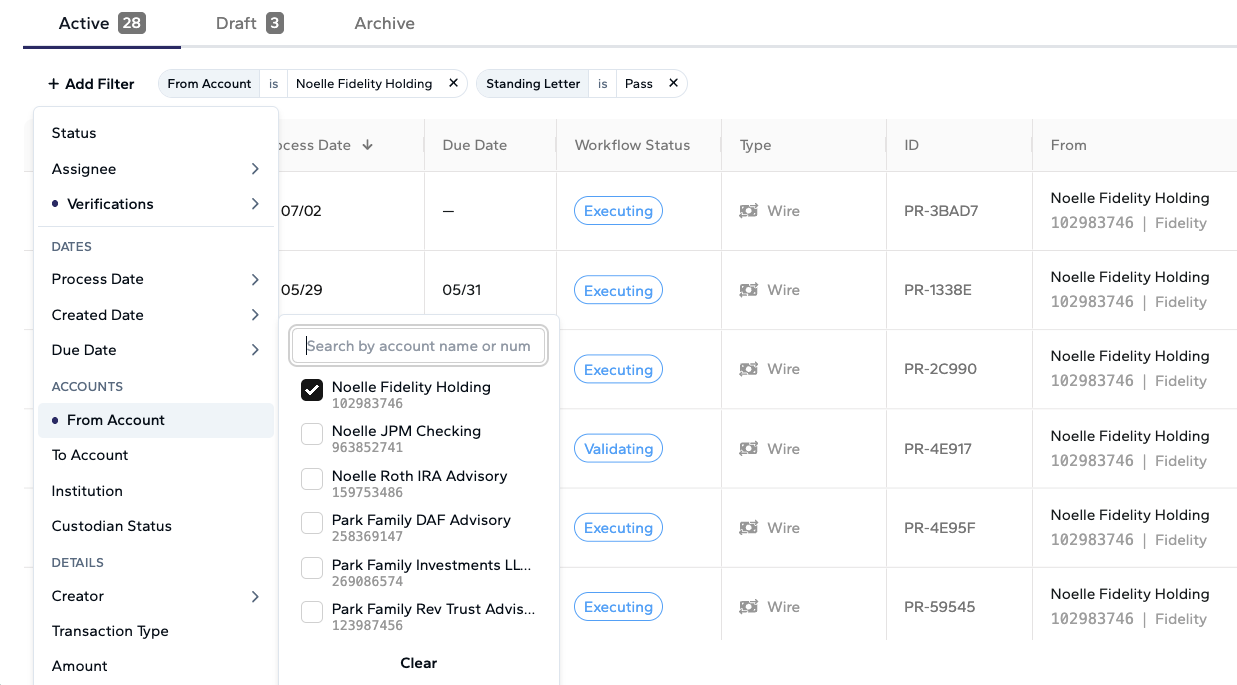
The payment request table now features a redesigned filter menu across the Active, Draft, and Archive tabs. You can filter by amount, transaction type, dates (process date, created date, and submitted date with quick presets), accounts (from, to, and institution), and Atomic’s automated verifications like SLOA and Cash.
Due Dates & Process Date
Payment requests now support a dedicated due date — the date a payment needs to be completed by (e.g., for a bill or capital call) — separate from the process date, which is when the custodian will execute the payment. This lets you track internal deadlines independently from custodian execution dates. Due dates are visible on the detail page, create/edit forms, and the clone modal, and carry over automatically when promoting drafts or cloning.
As part of this change, "Target Date" has been renamed to "Process Date" throughout the application to make the distinction clearer.
Bulk Edit for Draft Payment Requests
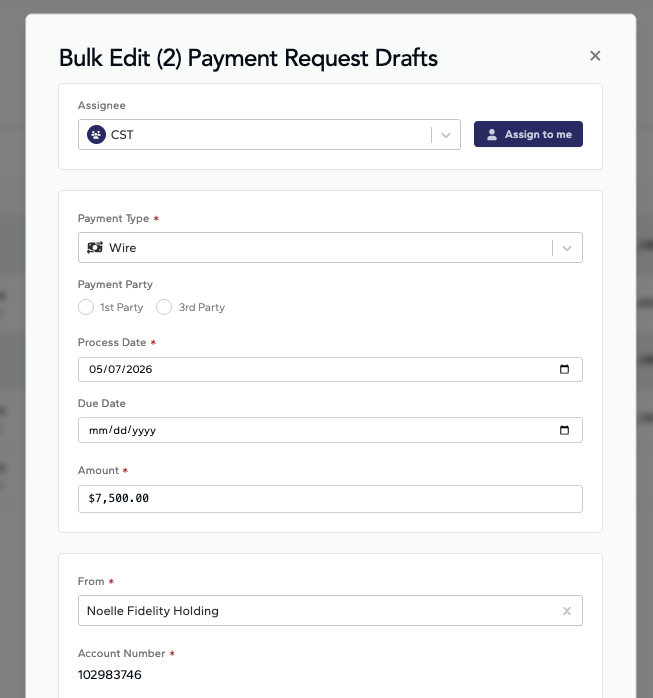
You can now select multiple draft payment requests and edit them in bulk, including updating the processing date, due date, and other fields across all selected drafts at once. This is especially useful when multiple draft capital calls arrive and need processing dates updated before being moved to active.
Duplicate Transaction Detection
The system now actively checks for potentially duplicated transactions when payment requests are created, scanning for matches within a +/- 7 day window. If a possible duplicate is detected, it is flagged with a verification indicator on the payment request detail page, helping you catch and review duplicate entries before they are processed.


Inline Editing & Copy Improvements
Copying values like payment request IDs, account numbers, and reference numbers from table cells is now fully supported via standard keyboard shortcuts (Ctrl+C / Cmd+C). Inline copy actions now show a brief "Copied!" message next to the item instead of a pop-up notification, providing faster, less intrusive confirmation.
Custodian Status & Fed Reference Number
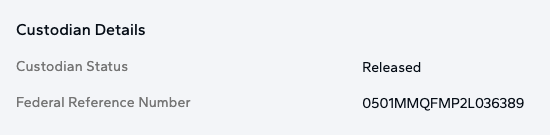
The payment request detail page now displays the custodian status and Federal reference number directly, so you no longer need to check the custodian portal separately to see these key fields.
Payment Request Table Performance
The payment request table and detail page now load significantly faster. Data fetching has been optimized and unnecessary repeated requests have been eliminated, reducing wait times — especially for organizations with a large volume of requests. The bulk selection limit has also been increased from 50 to 100.
Notification Preferences
Notifications are now automatically marked as read when you view them in the notification panel. Duplicate notifications for the same event have been eliminated, and confirmation notifications now include a "View" link that takes you directly to the relevant payment request.
Last Synced Timestamp
The Treasury and Cash Planner views now display a "Last Synced" timestamp, so you always know how recently your balance data was updated. This helps you understand the freshness of the data you are viewing when making payment or cash management decisions.
Audit Log Event Icons
The audit log now displays contextual icons for each event type, making it easier to visually scan and identify different kinds of activity (submissions, approvals, edits, etc.) as you review the history of a payment request.
Bulk Submit Preview Modal
The preview modal that appears when bulk-submitting payment requests has been enlarged and refreshed with an updated layout for improved clarity when reviewing and submitting multiple payment requests at once.
Badge & Label Cleanup
The "Default" and "Duplicate" indicator badges have been moved from the payment request table to the detail page to keep the main table cleaner. The date badge previously reading "Due Today" has been renamed to "Today" to avoid confusion with the separate Due Date column.
Button & Interaction Consistency
Buttons throughout the application now have more consistent styling and hover effects. Modal action buttons show proper loading states when processing bulk actions, preventing accidental double-clicks.
April included over a dozen bug fixes across the platform, including: accurate draft counts in the payment request table, reliable filter handling for names with special characters, correct Fidelity submission validation, proper dismissal of toast notifications on page navigation, fixed scroll bar issues, corrected date calculations in the Cash Planner, and resolved edge cases in bulk edit, bulk submit, and future-dated payment workflows.
Questions or feedback? Reach out to us at support@atomicinsights.io.

Atomic Insights © 2026