Atomic Highlights
March 2026 Product Release Notes

April 2, 2026


March 2026's headline release is the new Full Page Payment Request experience, replacing the previous modal with a dedicated page that provides more space, clearer workflow visualization, and shareable URLs for every payment. We also shipped a visual Workflow Stepper, inline editing, improved SLOA matching on capital call ingestion, and our first Addepar integration—all backed by a new feature flag infrastructure for safer, more controlled releases.
Full Page Payment Request
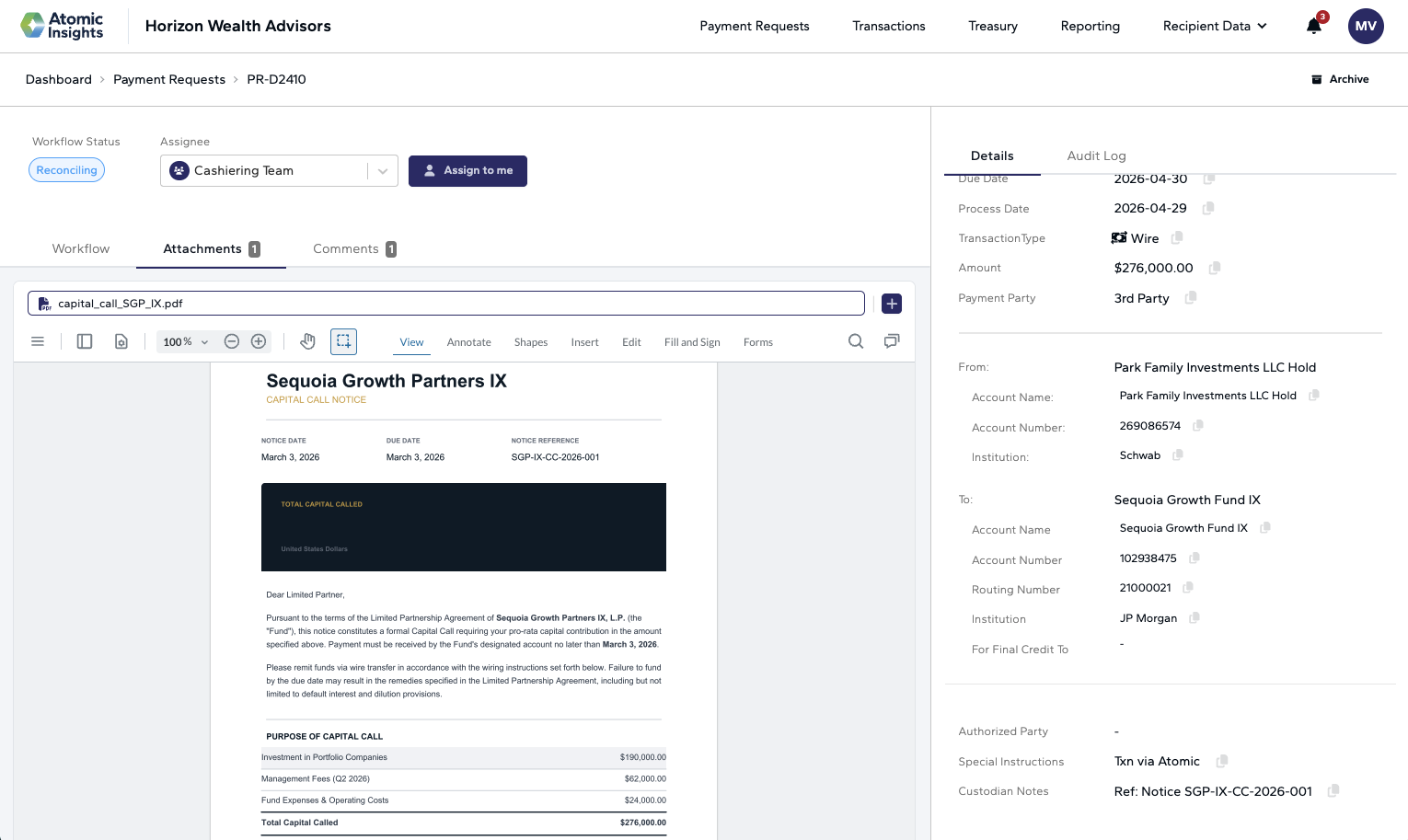
The biggest change this month: Payment Requests now open as a dedicated full page instead of a modal overlay. This redesign gives you significantly more room to work and clearly separates three key areas:
• Payment Details — What is being sent, where, and why
• Workflow — What step the PR is in and what action is required next
• Audit History — A complete timeline of changes and submissions
You can now edit and archive directly from the page, navigate back to the PR table via breadcrumbs, and share a unique URL for any payment request with teammates for quick access.
The new full page also includes:
• Default 150% attachment zoom — Documents now open at 150% zoom (up from ~85%), making capital call notices and payment documents much easier to read
• From/To sections default open — Account sections are expanded by default, reducing clicks to review or edit account information
• Full account number visibility — Account numbers display in full by default, eliminating the need to click to unmask
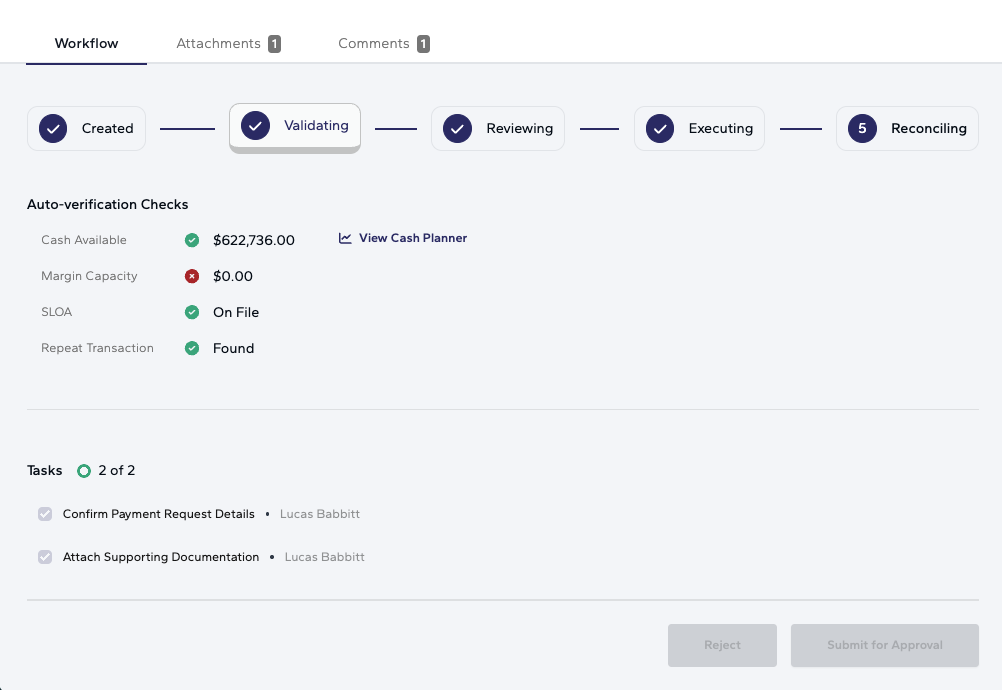
Workflow Stepper
Payment requests now include a visual step-by-step workflow progression bar, showing exactly where a PR is in its approval lifecycle and what action is required next. This makes it easy to see at a glance whether a payment is waiting on you, a colleague, or the custodian—and helps teams manage handoffs more confidently at scale.
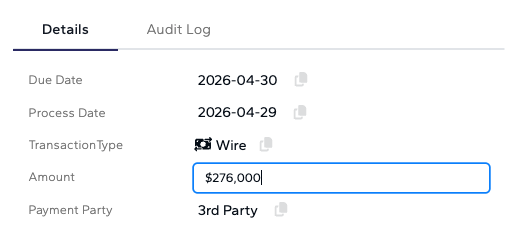
Inline Editing on Payment Requests
Edit payment request fields directly on the detail page—no more clicking a separate edit button. Any field that highlights on hover can be updated in place, and changes save immediately. When the amount or account is changed, verification checks (cash, margin, SLOA) refresh instantly to reflect the new values.
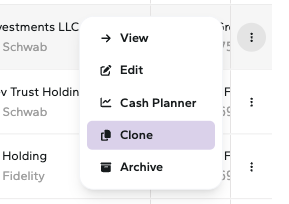
Clone Payment Requests
Quickly duplicate an existing payment request to create a new one with similar details. This is especially useful when resubmitting failed payments or creating recurring-style transactions—saving time on manual re-entry.
Future-Dated Payments (Flagship Custodian)
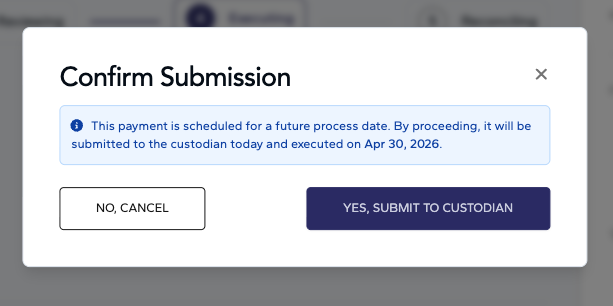
Submit payment requests with a future process date for Flagship Custodian accounts. Payments are sent to the custodian immediately but executed on their scheduled future date. A confirmation pop-up clearly indicates which payments will be future-dated before submission. This feature is currently available for the Flagship Custodian accounts only.
Bulk Move Drafts
Move multiple draft payment requests to the Active tab in a single action, streamlining the workflow for teams processing high volumes of capital calls and other payments.
Email Body Parsing
Atomic has always parsed emailed PDFs into payment requests. Now, we also process the email body itself—so when a client emails a payment request or capital call notice directly in the body of the email (without a PDF attachment), Atomic can ingest and process it automatically.
Notification Preferences
Users can now manage their notification settings and opt in or out of specific notification types, giving teams more control over which alerts they receive.
Selected Row Count Indicator
When selecting multiple payment requests in the PR table for bulk actions, a count indicator now shows exactly how many rows are selected—providing a clear safety check before submitting or editing in bulk.
Improved SLOA Matching on Capital Calls
The Arch capital call ingestion pipeline now uses an improved matching algorithm when selecting the sending account. The updated logic weighs SLOA coverage, account name similarity, and transaction history to produce better automatic matches—reducing the number of capital calls that require manual account selection.
Addepar Integration V1
Atomic now pulls account and balance data from Addepar, expanding data connectivity beyond Fidelity and Schwab. This is especially valuable for firms using Addepar as their portfolio management system, providing a more complete picture of cash positions across custodians.
Fidelity Check Payments
Atomic now supports submitting check payments through Fidelity's ICP API, expanding the range of payment types that can be processed directly from the platform.
Fidelity Account Short Names
Enhanced flat file import now pulls short names for Fidelity accounts, improving how accounts display across the platform and making it easier to identify the right account when searching
Feature Flag Infrastructure
Introduced a feature flag system for managing releases. Major updates now ship behind flags, allowing targeted rollouts to specific organizations and fast rollback if issues arise. This enables Atomic to ship faster while maintaining stability.
Structured Release Cadence
Production releases now follow a weekly Thursday cadence at 8 AM ET, with advance communication to clients. Feature flags gate major updates, giving teams confidence that new functionality won't disrupt active workflows unexpectedly.
Questions or feedback? Reach out to us at support@atomicinsights.io.

Atomic Insights © 2026